Repository: https://
Objectives
By the end of this workshop, participants will be able to:
Create a reproducible, released version of scientific code
Understand GitHub Actions workflows and their components
Automate linting, formatting, and versioning
Control workflow execution and pass information between jobs
(Bonus) Run workflows across environments and share artifacts
Lesson objectives
Lesson 1: What GitHub Actions and releases are, and why they matter for reproducible science
Lesson 2: How to modify workflows to automate versioned execution
Lesson 3: How to produce and reference a released version of scientific code
GitHub Releases as central to reproducibility
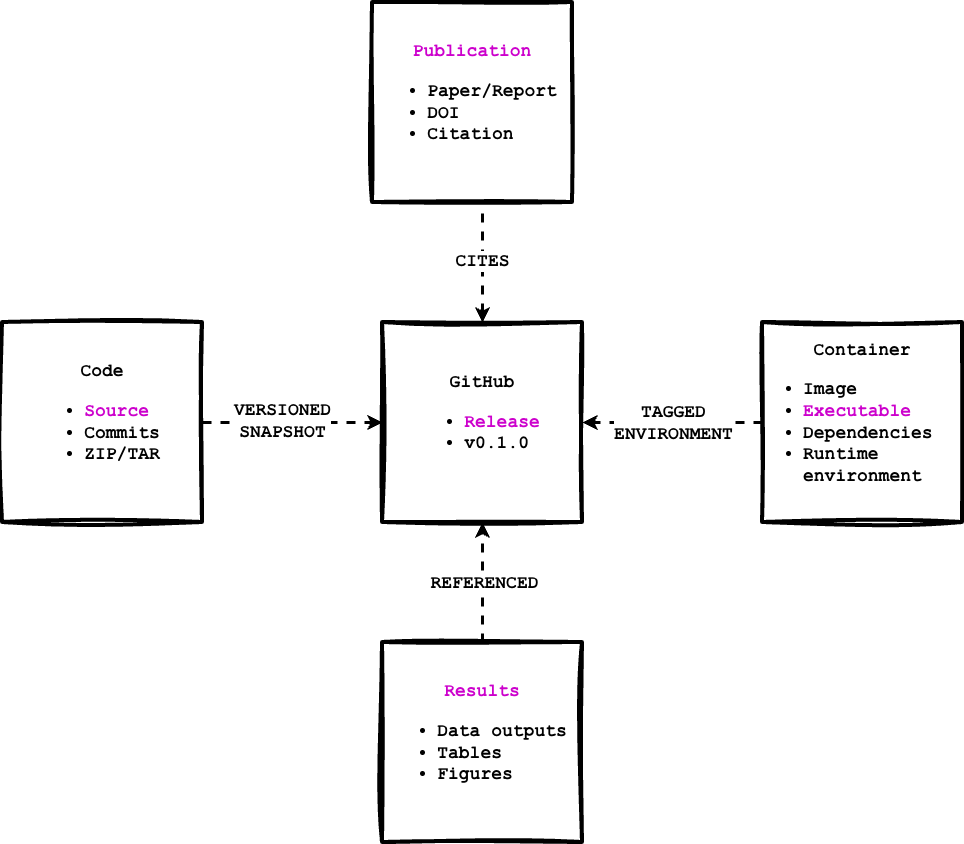
Workshop goal: Create a released version of the code. A GitHub release is a versioned snapshot of your code at a specific point in time:
Tied to a version number (e.g., v1.2.0)
Captures the exact files and changes
Provides downloadable source archives
Can include notes, citations, and related artifacts
For scientific code, releases:
Provide a stable reference for results
Connect figures and tables to code changes
Support long-term reproducibility
Can be cited in publications
The release is the connects: code → results → containers → publications
Symbols
👉 - Some action should be taken in the workshop steps (indicates interactive step)
🧰 - A tip that might make something easier or provides further explanation
🔍 - How to adapt the current workflow step to your own codebase
✨ - Time to pause for reflection and absorb content
✅ - Verification checkpoint to determine current progress
Pre-requisites
This workshop assumes some familiarity with GitHub and Python, but no prior experience with GitHub Actions or CI/CD is required.
Before attending, participants should complete the following:
Required
1. A GitHub account
A GitHub account is required to participate.
Public repositories are recommended (GitHub Actions runs are free).
2. A local development environment with Git installed
A laptop with macOS, Linux, or Windows
A terminal or command prompt
An IDE (VS Code, PyCharm) or a text editor (Atom, Sublime Text)
Git installed and working (
git --versionshould succeed)See “Install Git on Windows, macOS, Linux” for step-by-step instructions
For Windows users: We recommend using WSL (Windows Subsystem for Linux) for all terminal commands.
3. Configure SSH Authentication with GitHub
This allows you to push commits to GitHub
Set up an SSH key and add it to your GitHub account
Use the SSH repository URL (e.g., git@github.com:username/repo.git)
After setup, you can push without entering a password
See: “Set up SSH with GitHub” in the Appendix
4. Basic Git and GitHub knowledge
You should be comfortable with:
Cloning a repository
Creating and committing files
Pushing commits to a branch (e.g.,
main)
You do not need advanced Git skills (rebasing, submodules, etc.).
Recommended (but not strictly required)
Familiarity with Python scripts
Understanding what a Python script does and how to run one
You do not need to be an expert Python developer
Basic understanding of configuration files
Some exposure to formats like YAML, TOML, or JSON is helpful
YAML will be introduced during the workshop
Text editor or IDE
Examples: VS Code, PyCharm, Vim, or similar
Syntax highlighting for YAML is helpful but optional
Not Required
Prior experience with GitHub Actions or CI/CD
Experience publishing Python packages
Docker or container experience
HPC or cloud computing experience
Note: All workflows are executed using GitHub-hosted runners. You will not need to configure any external infrastructure or credentials for the core workshop material.
Lesson 1: GitHub Actions introduction
This lesson introduces GitHub Actions through a guided walkthrough of a full example, focusing on concepts rather than syntax.
Objectives:
Understand what GitHub Actions is and what types of tasks it can support
Review a full working example to understand the pieces of a continuous integration and continuous delivery (CI/CD) pipeline as a high level overview - There is no need to dive into the specifics quite yet!
Understand GitHub Actions quotas and limitations
GitHub Actions is a continuous integration and continuous delivery (CI/CD) platform that allows you to automate your build, test, and deployment pipeline. -- “Understanding GitHub Actions”
But what does that mean for a scientific algorithm or workflow?
How does this apply to scientific code that is not published as a package?
How do you tie code changes to results that are then referenced in a publication?
How do you support reproducible execution?
We will work toward answering these questions throughout the workshop. In short, CI/CD (including GitHub Actions) provides a practical framework for addressing them, but applying these ideas to scientific code requires first building a foundation in how CI/CD works beyond traditional software packaging and deployment.
At its core, a GitHub Actions workflow is a YAML file that defines automated tasks triggered by events such as pushes, pull requests, or manual runs. By borrowing established practices from Python package development and software engineering, these workflows can support reproducible execution, connect code changes to results, and bring CI/CD concepts into existing scientific codebases.
🧰 Throughout this workshop, remember: workflows define when automation runs, jobs define what runs, steps define how it runs, and actions package reusable functionality that steps can run. This will become more clear as we work through examples.
Example GitHub Actions workflows
Before we dive into building workflows ourselves, it helps to see how GitHub Actions is used in real projects. Below are a few concrete examples of scientific and research-adjacent repositories that use GitHub Actions for different goals: cloud deployment, traditional CI/CD, and data generation.
Confluence (MetroMan)
Confluence is a scientific workflow that produces river discharge estimates from satellite data. It is composed of multiple modules, one of which (MetroMan) implements a core hydrological algorithm.
This repository is a strong example of how a scientific algorithm can use GitHub Actions to deploy to cloud infrastructure.
Workflows:
https://
Key highlights:
deploy.yml – Builds a Docker image and deploys required cloud infrastructure across environments.
container.yml – Publishes a Docker image to GitHub Container Registry, freezing code + dependencies.
release.yml – Creates a versioned, citable GitHub release.
Hydrocron
Hydrocron is an API that allows users to query satellite data and retrieve time-series observations.
This repository demonstrates a traditional CI/CD workflow common in production software.
Workflow:
Key highlights:
Code versioning via branching strategy
Formatting and linting
Security vulnerability scanning
Unit and integration tests
Infrastructure build and deployment
DSI Clinic Project
This project supports analysis of college financial health and stability and highlights how GitHub Actions can automate data generation.
Workflow:
Key highlights:
Scheduled execution
Docker-based data pipeline
Multi-stage data processing and geocoding
JSON outputs committed back to the repository
Why these examples matter
Together, these examples show that GitHub Actions can support:
Cloud deployment of scientific algorithms
Mature CI/CD pipelines
Automated, versioned data generation
The remainder of this workshop focuses on building a minimal, reproducible version of these ideas using versioning and releases.
Reference Example: Full GitHub Actions Setup
This GitHub repository contains everything!! It includes implemented best practices and forms the foundation for the RSE workshop series (this workshop’s repository was created from it). This repository contains a complete example that forms the foundation of the RSE workshop series. It includes:
A toy scientific workflow (climate pattern prediction from sea surface temperature data)
A fully defined GitHub Actions workflow following best practices (uses GitHub secrets; more advanced)
GitHub templates for issues, pull requests, and discussions
Core open source project files (README, license, code of conduct, citation)
Python package-style layout (src/ and tests/)
A GitHub Pages documentation site (docs/)
A Dockerfile for building a containerized executable
Repository settings that support long-term maintenance (branch protection, etc.)
Workshop focus: For this workshop, primary attention will be on the GitHub Actions workflow definition file.
Workshop Example: Simplified Workflow
The full workflow example is fairly complex. For this workshop, we will use a simpler version that still includes key pieces from the complete example, but lets you start small and add one piece at a time.
Throughout the workshop, we will highlight checkpoints in the code and use 🔍 callouts to show how GitHub Actions can be adapted for existing codebases.
We will focus on the major components first, then introduce additional pieces from the full example for context and completeness.
Workshop focus vs. reference content
The simplified workflow derived from the full example will focus on a core subset of jobs that support reproducible science:
Workflow setup and triggers
Linting + basic quality checks
Versioning and releases
Other jobs (testing matrices, security scanning, container builds, documentation) are included as reference to show how a complete, production-ready workflow can grow over time but they are not required to follow the workshop.
Workshop components (we will focus on these)
Let’s walk through some of the workshop sections to better understand what you can do with GitHub actions and how it supports our goal of tying versions of code to results.
Don’t worry about the technical details and definitions at this point as we will dive into those later in the workshop.
Workflow set up (workshop core)
Set the name of your workflow:
name: Deploy Workshop Workflow🧰 Note: You are not expected to write or fully understand these YAML files yet. The goal of this lesson is to recognize the structure of a workflow and how it connects code changes to results.
Define when the workflow is triggered:
on:
  push:
    branches: [ dev, main ]
You can automatically trigger workflow execution using different event types. In this case you can trigger it to run whenever a commit is pushed to the
devormainbranches
Only let one instance of the workflow execute at a time:
concurrency:Define environment variables for the entire workflow:
env:Jobs (workshop core)
Jobs execute steps in a workflow. You define jobs in the workflow file to indicate you are going to list all of the jobs:
jobs:Lint and Format Job (workshop core)
The lint and format job uses ruff to lint and format the codebase. Both linting and formatting are about code quality and help maintain a codebase over time keeping the code “clean” and formatted through versions.
A linter will analyze code and flag bugs, error-prone patterns, unused variables and imports, and violations of code rules.
A formatter rewrites your code’s layout so it follows a standard style around indentation, spacing, line breaks, quote style, and brace placement.
  lint-and-format:
    runs-on: ubuntu-latest
    steps:
This repo uses ruff for both linting and formatting. The Ruff Formatter Documentation
Version Job (workshop core)
This job is a little bit complicated as version control can be hard! This step takes the version as defined in the pyproject.toml file and updates it based on the current branch (as determined by the push trigger). So this job locates the next version of the application. This is super helpful in tying results to code as a version provides a numeric tag which can be used to identify code modifications and supports the creation of a release (the last step in the workflow).
jobs:
  version:
    runs-on: ubuntu-latest
    outputs:
      app_version: ${{ steps.release.outputs.app_version != '' && steps.release.outputs.app_version || steps.get_version.outputs.app_version }}
    steps:
Release job (workshop core)
The release job creates a release in the GitHub repository. A release generates compressed archives of your codebase that capture all modifications at the time the release is created. You can also include release notes, a list of contributors, and links to binary files. See the documentation for more information.
This is really helpful for tying specific code modifications to results. By associating a particular version of your code with a release, you can support reproducible executions of your algorithms and reference that exact version in a publication.
In our example, the release does not include a full executable since we rely on the container image for that, but it does allow us to retain compressed source archives that can be used to connect results to a specific version.
jobs:
  release:
    runs-on: ubuntu-latest
    steps:
Test Job (BONUS)
The test job executes existing unit tests located in the test directory on multiple Python versions using a matrix (more to follow in the workshop). This ensures any changes you made do not break previous functionality and execution of the code is performing as you would expect.
  test:
    runs-on: ubuntu-latest
    strategy:
      matrix:
        python-version: ["3.10","3.11","3.12"]
    steps:
Reference example components
The full reference example includes all of the above workshop components plus a few extra components detailed below.
Scan Job (reference only)
The scan job scans the codebase for any security vulnerabilities and reports on them in the Security tab in the GitHub repository. This ensures anything deployed to an HPC cluster, the cloud, or collaborators’ laptops does not include vulnerabilities that could impact computing and risk data breaches.
  scan:
    runs-on: ubuntu-latest
    permissions:
      contents: read
      security-events: write
    steps:
This repo uses GitHub’s code scanning. GitHub code scanning documentation
Build and deploy job (reference only)
This job builds a Docker container, tags it with a specific version, and deploys it to the GitHub Container Registry. The resulting containerized executable captures a fixed snapshot of the code and its dependencies, ensuring it can be run consistently across different environments.
By versioning and hosting the container alongside the codebase, you create a stable, citable artifact that can be referenced to reproduce the exact computational results used in a publication.
This makes it possible to rerun analyses, regenerate figures, and validate results long after the original development environment has changed supporting transparency, reproducibility, and long-term research integrity. (Plus it is automated so you don’t have to manually build a container with each release.)
build-deploy:
    runs-on: ubuntu-latest
    needs: [lint-and-format, scan, test, version]
    if: needs.version.result == 'success' && (needs.version.outputs.dev_ran == 'true' || needs.version.outputs.release_ran == 'true')
    permissions:
      contents: read
      packages: write
    steps:
Documentation job (reference only)
You can create Markdown files to document how to install, set up, and use your codebase. These files can include Jupyter notebooks and detailed descriptions of specific functions or methods that align with content in a publication. You can also automatically generate documentation that includes function signatures, arguments, and return values. All of this documentation can be hosted on a GitHub Pages website.
This is bonus content and is considered slightly more advanced! It will not be covered in this workshop but is shared here as it is a part of the complete example.
name: Build and Deploy Documentation

on:
  push:
    branches:
      - main
    paths-ignore:
      - pyproject.toml
      - uv.lock
  workflow_dispatch:

permissions:
  contents: write

jobs:
  build-and-deploy:
    runs-on: ubuntu-latest
    steps:
GitHub Actions quotas and limitations
GitHub Actions usage is free for public repositories. Any usage beyond this is billed to your account. See billing documentation for more information.
The limitations are detailed here and include:
2,000 minutes for workflow execution
500MB of artifact storage
10GB of cache storage
A workflow execution limit of 35 days
Each job in a workflow can run up to 6 hours
A default concurrency limit of 20 jobs
If your account does not have a valid payment method on file, usage is blocked once you use up your quota.
You can check your quota usage for a repository under the Insights tab by navigating to “Actions usage metrics.”
These limits matter most when workflows run frequently, build containers, or process large datasets; common patterns in research workflows.
Summary
In this lesson, you were introduced to GitHub Actions and how workflows automate common tasks in a repository. Rather than focusing on syntax, the emphasis was on building a mental model for how automation runs in GitHub and how the pieces fit together.
You also explored why GitHub Actions are useful for scientific and research code, where reproducibility depends on rerunning the same steps consistently over time. You should now be able to recognize the core components of a GitHub Actions workflow and understand their roles.
In Lesson 2, we will move from recognizing workflows to modifying and creating them, and you will see how changes to a workflow affect automation, versioning, and reproducibility.
✨Pause for Reflection #1 (3-4 min)✨
Grab a piece of paper or sticky note and write short bullets, no full sentences needed.
Where do your “results” live right now?
e.g., figures/plots, tables, intermediate files, model weights, notebooks, manuscripts
What’s the “source of truth” when someone asks: “Which run produced Figure 2?”
Imagine it’s 6 months from now and you need to reproduce a key figure. What are the top 2 things most likely to break?
(dependencies? data path? randomness? missing scripts?)
Pick 1 workflow job you’d want “future you” to have. Why?
Lint/format, tests, versioning, release, container build, docs
Optional pair-share (1 min): Tell your neighbor what your “biggest reproducibility failure mode” is—and which job would reduce it.